Authorization
Authentication & Authorization
There are several reasons why you could choose to implement an authentication and authorization system in your API, even if it is not strictly required by the SensorThings API specification. Some of the main reasons include:
- Security: Implementing authentication and authorization helps protect your API from unauthorized access and potential misuse. It ensures that only authorized users can access sensitive data or perform certain actions, reducing the risk of data breaches and other security incidents.
- Access Control: By implementing an authentication and authorization system, you can control who has access to specific resources and functionalities within your API. This allows you to enforce different levels of access based on user roles or permissions, ensuring that users only have access to the resources and actions that are relevant to their needs.
- User Management: An authentication and authorization system allows you to manage user accounts and their associated permissions. This can be particularly useful in scenarios where you have multiple users accessing your API, as it allows you to easily manage and track user activity, as well as revoke access when necessary.
- Compliance: In some cases, implementing authentication and authorization may be required to comply with industry standards or regulations, such as GDPR or HIPAA. By implementing these mechanisms, you can ensure that your API meets the necessary compliance requirements and protects user data in accordance with relevant laws and regulations.
- Auditability: An authentication and authorization system can provide an audit trail of user activity, allowing you to track who accessed what resources and when. This can be valuable for troubleshooting, monitoring usage patterns, and identifying potential security issues or misuse of the API.
- Integration with Other Systems: Implementing authentication and authorization can facilitate integration with other systems and services that require secure access. For example, if you want to integrate your API with a third-party application or service, having an authentication and authorization system in place can help ensure that the integration is secure and that only authorized users can access the integrated functionality.
OAuth 2.0
OAuth 2.0 (Open Authorization) is an authorization framework that allows third-party applications to grant access to a user's resources without sharing their credentials. It is widely used for secure delegated access to resources across web applications and APIs. In the context of our istSOS4 SensorThingsAPI implementation, we have implemented the OAuth 2.0 "password" flow to manage user authentication and authorization. This allows users to securely access the API by providing their credentials and obtaining a token that can be used for subsequent requests.
The password flow
The password "flow" is one of the ways ("flows") defined in OAuth2, to handle security and authentication. OAuth2 was designed so that the backend or API could be independent of the server that authenticates the user. But in this case, the same application will handle the API and the authentication.
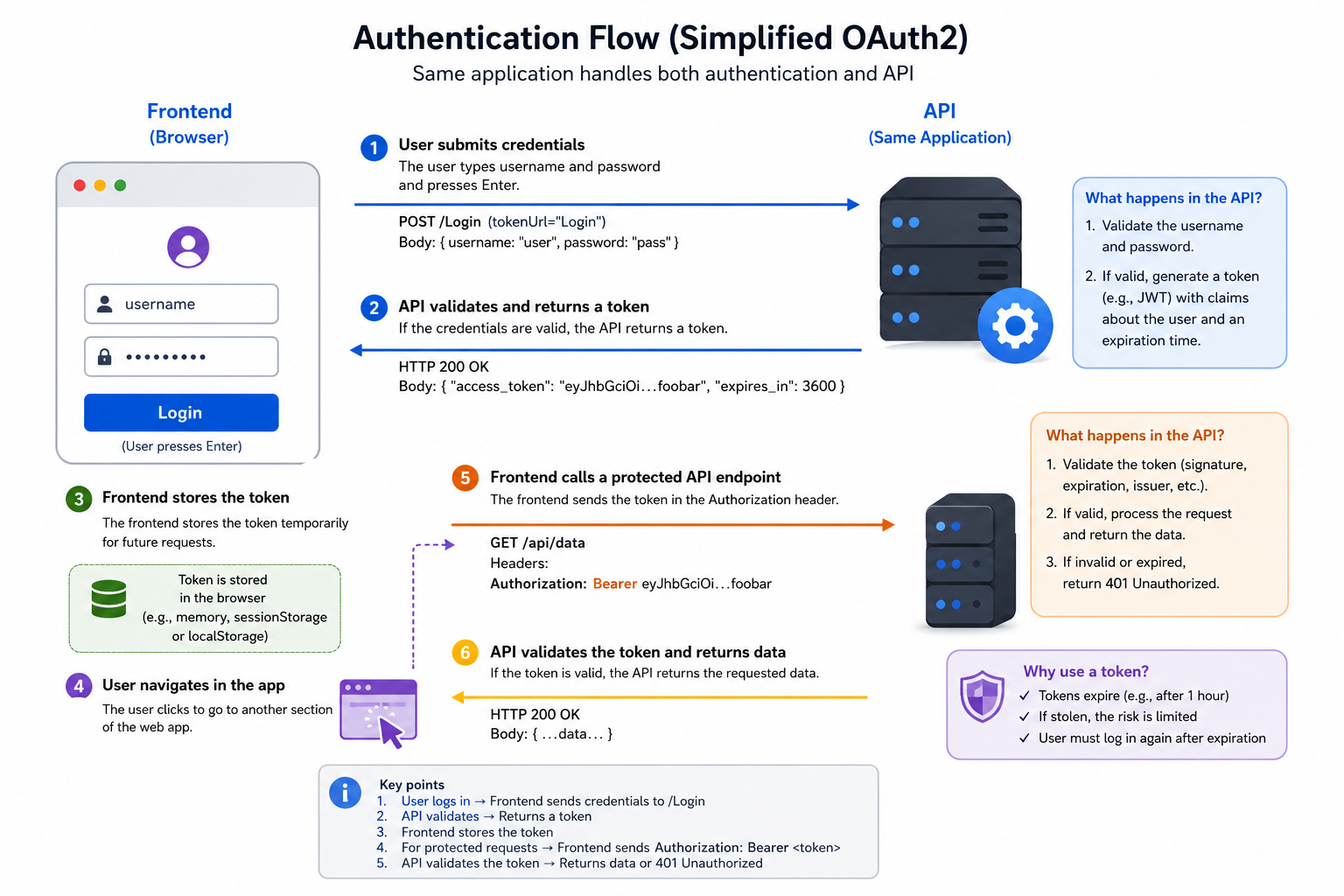
So, let's review it from that simplified point of view:
- The user types the
usernameandpasswordin the frontend, and hitsEnter. - The frontend (running in the user's browser) sends that
usernameandpasswordto a specific URL in our API (declared withtokenUrl="Login"). - The API checks that
usernameandpassword, and responds with a "token"- A "token" is just a string with some content that we can use later to verify this user.
- Normally, a token is set to expire after some time.
- So, the user will have to log in again at some point later.
- And if the token is stolen, the risk is less. It is not like a permanent key that will work forever (in most of the cases).
- The frontend stores that token temporarily somewhere.
- The user clicks in the frontend to go to another section of the frontend web app.
- The frontend needs to fetch some more data from the API.
- But it needs authentication for that specific endpoint.
- So, to authenticate with our API, it sends a header
Authorizationwith a value ofBearerplus the token.
Foe example: if the token contains foobar, the content of theAuthorizationheader would be:Bearer foobar.