Traveltime in istSOS4
Managing Temporal Queries in istSOS4
Implementing temporal queries in SensorThings API and istSOS4 has been addressed by a swissuniversities project named OSIReS. The project has proposed an OGC SensorThings API extension named Traveltime that includes support for temporal queries and versioning, allowing users to access historical versions of data and metadata. This extension is designed to be compatible with the existing SensorThings API specification, while providing additional functionality for managing temporal data. By using this extension, users can query the API to retrieve data as it was at a specific point in time, enabling historical analysis and tracking changes over time.
Versioning and commit messages
Being able to access historical states of data and metadata is a fundamental requirement for temporal queries, but it is not sufficient on its own. To ensure that the history of changes is properly documented and can be traced back, it is essential to implement a versioning system that records every modification made to the data. This is where commit messages come into play. In a versioning system, every time a change is made to the data, it is recorded as a new version, and a commit message is associated with that change. The commit message serves as a descriptive note that explains the nature of the change, the reason behind it, and the author.
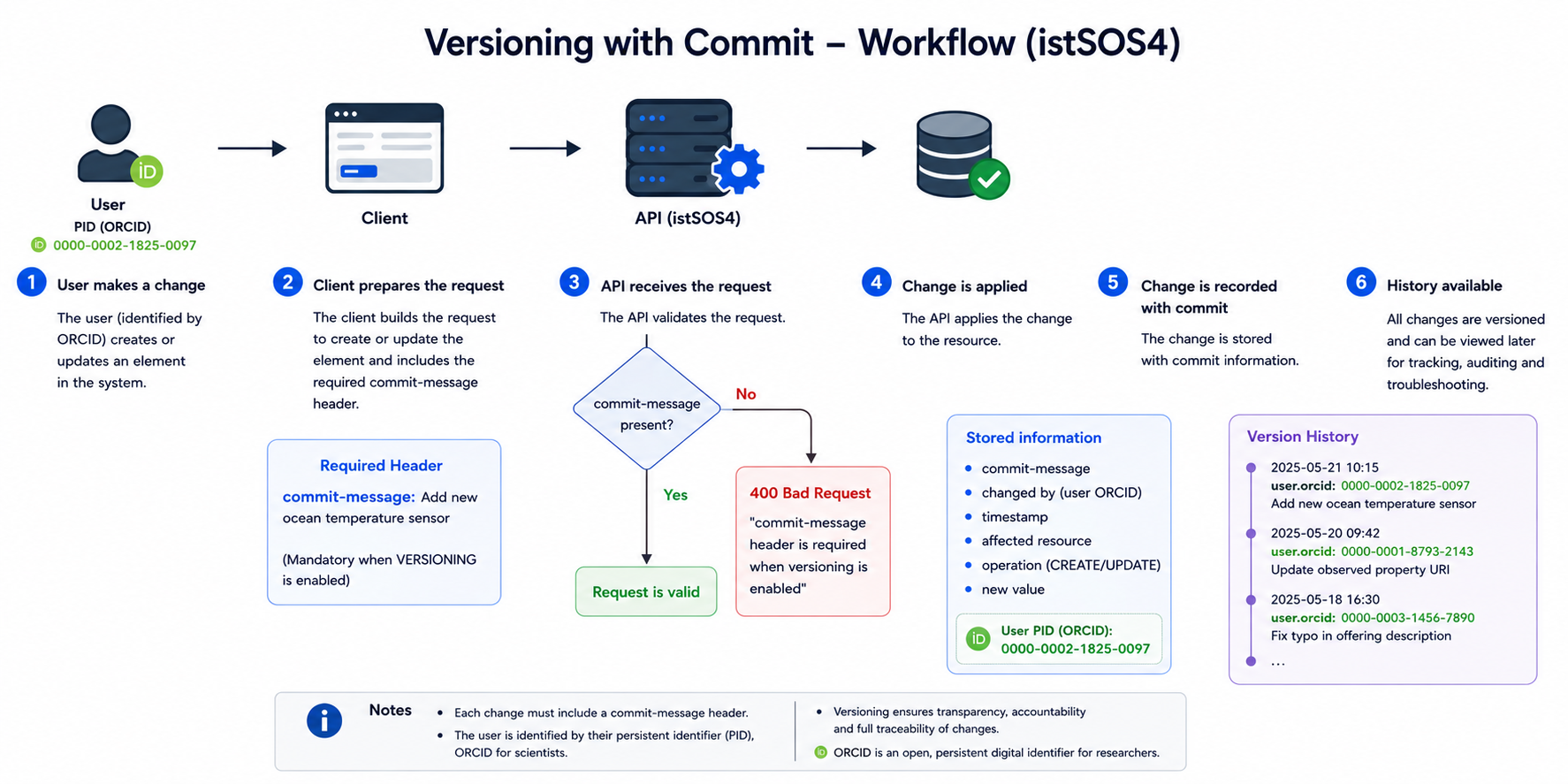
In istSOS4, we have the option to enable the VERSIONING option in our configuration (this is the case for the defult setting of this workshop).
This means that, once activated, every time you create or update an element in the system this is registered as a change in the database, and a new version of the element is created.
To ensure that these changes are properly documented, every time you create or update an element in the system, you need to provide a commit-message in the header of the request.
This is a mandatory requirement to ensure that all changes are properly documented and can be tracked over time. The commit-message should provide a brief description of the change being made, which helps in maintaining a clear history of modifications and allows for better collaboration among users.
By enforcing the use of commit messages, we can enhance the transparency and accountability of changes made to the system, making it easier to understand the context of each change and facilitating troubleshooting and auditing processes when needed.
Create a Thing
Now login in you swagger as editor and try again to create a Thing !
swagger endpoints
Depending on how you're doing the workshop, you can use the following endpoints to create a Thing:
Since you're logged in as an Editor, you have the necessary privileges to create a Thing.
You can send a POST request to the /Things with the following commit message in the header:
commit-message: "Creating a new Thing for Lugano Lake"
And the following JSON body:
{
  "name": "Lugano Lake",
  "description": "The Alpine Lake located in the southern part of Switzerland",
  "properties": {
    "Catchment area": "565.6 km2",
    "Maximum depth": "288 m",
    "Surface Area": "38.7 km2",
    "Avereage depth": "124 m",
    "Water volume": "6.5 km3",
    "Surface elevation": "271 m",
    "Primary inflows": ["Cassarate", "Vedeggio", "Magliasina", "Cuccio", "Laveggio", "Bolletta", "Scairolo"],
    "Primary outflows": ["Tresa"]
  }
}
Warning
You may get an error message if you didn't provide any commit-message in the header of the request,
which is mandatory to create or update any element in the system since we have enabled the VERSIONING option in our configuration.
You should therefore see the following response which includes the location of the newly created Thing as link in the header:
Code
  201 Created
Response headers
  content-length: 0
  date: Fri,22 May 2026 16:08:03 GMT
  location: http://localhost:8018/v4/v1.1/Things(<id>)
  server: uvicorn
location header
The location header in the response provides the URL of the newly created entity, which can be used to access or modify the entity in future requests.
This is a standard practice in RESTful APIs to indicate the location of a newly created resource.
Update a Thing
Now, let's try to update the Thing we just created.
To do this, you can send a PATCH request to the /Things(<id>) endpoint along with a commit-message in the header and a JSON body with the properties you'd like to update. For example, you can update the surface area and average depth of the Lugano Lake with the following request:
commit-message: "Updated surface area and average depth of Lugano Lake"
{
  "properties": {
    "Surface Area": "48.7 km2",
    "Avereage depth": "134 m"
  }
}
You should see the following response:
Code
  200 No Content
Response headers
  content-length: 0
  date: Sat,23 May 2026 12:14:12 GMT
  server: uvicorn
Retrieve data with commit message
To access the data, navigate to the interactive documentation at: /Things and execute a GET request to retrieve the list of Things in the system with the following parameters:
$filter=name eq 'Lugano Lake'&$expand=Commit
You should see the uopdated Thing with the updated properties and the commit message associated with the last update, which should be something like:
{
  "@iot.as_of": "2026-05-23T12:30:18Z",
  "value": [
    {
      "@iot.id": 9,
      "@iot.selfLink": "http://localhost:8018/v4/v1.1/Things(9)",
      "Locations@iot.navigationLink": "http://localhost:8018/v4/v1.1/Things(9)/Locations",
      "HistoricalLocations@iot.navigationLink": "http://localhost:8018/v4/v1.1/Things(9)/HistoricalLocations",
      "Datastreams@iot.navigationLink": "http://localhost:8018/v4/v1.1/Things(9)/Datastreams",
      "Commit@iot.navigationLink": "http://localhost:8018/v4/v1.1/Things(9)/Commit(7)",
      "name": "Lugano Lake",
      "description": "The Alpine Lake located in the southern part of Switzerland",
      "properties": {
        "Surface Area": "48.7 km2",
        "Avereage depth": "134 m"
      },
      "Commit": {
        "date": "2026-05-23T12:14:13Z",
        "author": "/Users(1)",
        "@iot.id": 7,
        "message": "Updated surface area and average depth of Lugano Lake",
        "actionType": "UPDATE",
        "encodingType": "text/plain",
        "@iot.selfLink": "http://localhost:8018/v4/v1.1/Commits(7)"
      }
    }
  ]
}
- The
@iot.as_ofproperty indicates the timestamp of the data retrieval, which is useful for tracking when the data was accessed. - The
Commitproperty provides detailed information about the last commit associated with the Thing, including thedateof the commit, theauthor, themessage, and theactionTypeperformed (in this case, an update).
Retrieve Entity change history
To access the change history of an entity, you can send a GET request to the /Things(<id>) endpoint and set the $from_to parameter with the desired time range.
For example you can use the last commit message date - 1 day as the from of the time range and a date + 1 day as the to of the time range, like this:
$from_to=2026-05-22T00:00:00Z/2026-05-23T23:59:59Z
{
  "value": [
    {
      "@iot.id": 9,
      "@iot.selfLink": "http://localhost:8018/v4/v1.1/Things(9)",
      "Locations@iot.navigationLink": "http://localhost:8018/v4/v1.1/Things(9)/Locations",
      "HistoricalLocations@iot.navigationLink": "http://localhost:8018/v4/v1.1/Things(9)/HistoricalLocations",
      "Datastreams@iot.navigationLink": "http://localhost:8018/v4/v1.1/Things(9)/Datastreams",
      "Commit@iot.navigationLink": "http://localhost:8018/v4/v1.1/Things(9)/Commit(6)",
      "name": "Lugano Lake",
      "description": "The Alpine Lake located in the southern part of Switzerland",
      "properties": {
        "Surface Area": "38.7 km2",
        "Water volume": "6.5 km3",
        "Maximum depth": "288 m",
        "Avereage depth": "124 m",
        "Catchment area": "565.6 km2",
        "Primary inflows": [
          "Cassarate",
          "Vedeggio",
          "Magliasina",
          "Cuccio",
          "Laveggio",
          "Bolletta",
          "Scairolo"
        ],
        "Primary outflows": [
          "Tresa"
        ],
        "Surface elevation": "271 m"
      },
      "systemTimeValidity": "2026-05-23T12:08:09Z/2026-05-23T12:14:13Z",
      "Commit": {
        "date": "2026-05-23T12:08:09Z",
        "author": "/Users(1)",
        "@iot.id": 6,
        "message": "Creating a new Thing for Lugano Lake",
        "actionType": "CREATE",
        "encodingType": "text/plain",
        "@iot.selfLink": "http://localhost:8018/v4/v1.1/Commits(6)"
      }
    },
    {
      "@iot.id": 9,
      "@iot.selfLink": "http://localhost:8018/v4/v1.1/Things(9)",
      "Locations@iot.navigationLink": "http://localhost:8018/v4/v1.1/Things(9)/Locations",
      "HistoricalLocations@iot.navigationLink": "http://localhost:8018/v4/v1.1/Things(9)/HistoricalLocations",
      "Datastreams@iot.navigationLink": "http://localhost:8018/v4/v1.1/Things(9)/Datastreams",
      "Commit@iot.navigationLink": "http://localhost:8018/v4/v1.1/Things(9)/Commit(7)",
      "name": "Lugano Lake",
      "description": "The Alpine Lake located in the southern part of Switzerland",
      "properties": {
        "Surface Area": "48.7 km2",
        "Avereage depth": "134 m"
      },
      "systemTimeValidity": "2026-05-23T12:14:13Z/infinity",
      "Commit": {
        "date": "2026-05-23T12:14:13Z",
        "author": "/Users(1)",
        "@iot.id": 7,
        "message": "Updated surface area and average depth of Lugano Lake",
        "actionType": "UPDATE",
        "encodingType": "text/plain",
        "@iot.selfLink": "http://localhost:8018/v4/v1.1/Commits(7)"
      }
    }
  ]
}
systemTimeValidity
The systemTimeValidity property indicates the time range during which a specific version of the entity was valid in the system. infinity is used to indicate that the current version of the entity is valid indefinitely until another update is made.
This allows users to understand the historical context of the data and track changes over time, providing insights into how the entity has evolved.
Retrieve commits of one entity
To retrieve the list of commits associated with a specific entity, you can send a GET request to the /Things(<id>)/Commit endpoint. This will return a list of all commits that have been made to that entity, along with their details such as the date, author, message, and action type. This information can be useful for tracking the history of changes made to the entity and understanding the context of those changes.
http://localhost:8018/v4/v1.1/Things(9)/Commit